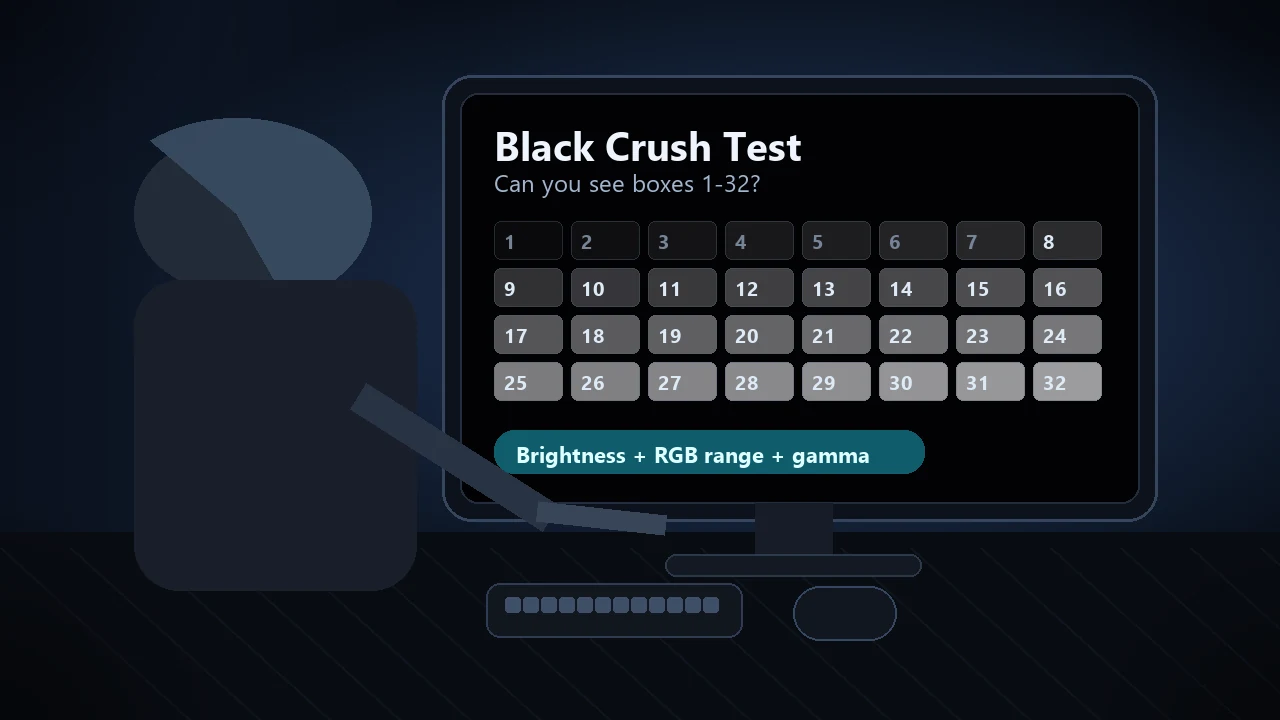
Count visible patches 1-32 on black background. All visible = healthy. Missing low = crushed blacks.
Count the gray patches on the black background. You should be able to see all 32, labelled 1 to 32. If the lowest numbers (1-5) are invisible, your monitor is crushing blacks - raise brightness or change the OSD black-level / Black eQualizer setting.
Best in a dark room — let your eyes adjust for about 5 minutes and set monitor brightness low.
Was this tool helpful?Rate Black Level Test:4.8(5 ratings)Thanks for rating!
Black Level Test is a free, browser-based black level / crushed blacks test.
Cost: Free, no signup
Install: None — runs in the browser
Privacy: Runs locally, no uploads
Platforms: Windows, macOS, Linux, Android, iOS
Time: Under a minute
What Is a Black Level Test?
A black level test (or crushed blacks test) checks whether your monitor can distinguish very dark colors from pure black. We display 32 patches at RGB values 1 through 32 on a pure black background. A correctly calibrated monitor shows all 32 distinct steps. A monitor with crushed blacks merges low values into solid black, hiding shadow detail in movies, games, and photos.
How to Read Your Result
All 32 visible: Excellent black level. Your monitor preserves shadow detail.
Visible from 4-32: Mild crushing. Monitor brightness too low or wrong gamma.
Visible from 8-32: Moderate crushing. Adjust monitor's "Black Level" setting in OSD or increase brightness.
Visible from 16+: Severe crushing. Monitor in "Limited" RGB range mode (16-235) instead of "Full" (0-255). Switch GPU output to Full RGB.
How to Fix Crushed Blacks
Check GPU RGB range: Nvidia Control Panel > Display > Output dynamic range = Full. AMD: Display > Pixel Format = RGB 4:4:4 Full.
Monitor OSD: Look for Black Level / Black eQualizer. Set to standard or normal.
Brightness too low: Below 20%, near-black detail vanishes.
Wrong gamma: Run our monitor gamma test. If gamma is too high (2.4+), shadows crush.
Need the full step-by-step workflow? Read the black crush test guide for brightness, HDMI black level, Full RGB, gamma, HDR, and OLED settings.
A black level test displays 32 near-black patches, RGB 1 through 32, on a pure black background to check whether your monitor reproduces shadow detail. If the darkest patches are invisible, the display is crushing blacks.
What does it mean if the lowest patches are invisible?
Missing low patches mean near-black shades are being mapped to pure black, a problem known as crushed blacks. Common causes are a limited-range (16-235) GPU output feeding a full-range monitor, or brightness set too low.
How do I run the black level test correctly?
Dim the room lights, enter fullscreen mode, and count how many of the 32 numbered patches you can separate from the black background. A healthy setup shows all or nearly all patches; several missing low steps indicate crushed shadow detail.
How do I fix crushed blacks?
Set the GPU output range to Full (0-255) for PC monitors in your graphics control panel, then raise the monitor brightness until the lowest patches just become visible. On TVs, also check the HDMI black level or input range option.
Is the black level test free?
Yes. The black level test runs entirely in your browser with no download or signup - it simply renders test patterns on your own screen and nothing is uploaded.